<?xml version="1.0" encoding="utf-8"?>
<feed xmlns="http://www.w3.org/2005/Atom">
  <author>
    <name>wxsm</name>
  </author>
  <generator uri="https://hexo.io/">Hexo</generator>
  <icon>https://wxsms.github.io/blog/icon.png</icon>
  <id>https://wxsms.github.io/blog/</id>
  <link href="https://wxsms.github.io/blog/" rel="alternate"/>
  <link href="https://wxsms.github.io/blog/atom.xml" rel="self"/>
  <rights>All rights reserved 2026, wxsm</rights>
  <title>wxsm's pace</title>
  <updated>2026-10-18T01:01:52.855Z</updated>
  <entry>
    <author>
      <name>wxsm</name>
    </author>
    <category term="go" scheme="https://wxsms.github.io/blog/tags/go/"/>
    <category term="etcd" scheme="https://wxsms.github.io/blog/tags/etcd/"/>
    <id>https://wxsms.github.io/blog/2024/etcd-queue-problem/</id>
    <link href="https://wxsms.github.io/blog/2024/etcd-queue-problem/"/>
    <published>2024-01-12T07:14:16.000Z</published>
    <summary>
      <![CDATA[<p>etcd 是分布式系统中的一个重要基础中间件，为 K8s 等关键基础设施提供了底层的 KV 储存能力。摘自 Github 描述：</p>
<blockquote>
<p>Distributed reliable key-value store for the most critical data of a distributed system.</p>
</blockquote>
<p>由于业务需要，我项目中使用了 etcd 官方客户端 clientv3 及其源码仓库中提供的队列实现（当时的版本为 3.5.11），并意外地发现了一系列问题，故事从这里开始。</p>]]>
    </summary>
    <title>etcd 队列引发的问题一则及源码解析</title>
    <updated>2026-10-18T01:01:52.855Z</updated>
  </entry>
  <entry>
    <author>
      <name>wxsm</name>
    </author>
    <category term="go" scheme="https://wxsms.github.io/blog/tags/go/"/>
    <category term="pprof" scheme="https://wxsms.github.io/blog/tags/pprof/"/>
    <id>https://wxsms.github.io/blog/2023/go-pprof-note/</id>
    <link href="https://wxsms.github.io/blog/2023/go-pprof-note/"/>
    <published>2023-09-11T08:01:04.000Z</published>
    <summary>
      <![CDATA[<p><a href="https://github.com/google/pprof">pprof</a> 是 Google 开发的一款用于数据分析和可视化的工具。</p>
<p>最近我编写的 go 程序遇到了一次线上 OOM，于是趁机学习了一下 Go 程序的性能问题排查相关知识。其基本路线是：先通过内置的 <code>net/http/pprof</code> 模块生成采集数据，然后在使用 pprof 命令行读取并分析。Go 语言目前已经内置了该工具。</p>
<p>本文不会介绍 pprof 的太多细节，只关注主要流程（主要的是太细的我现在也不会）。</p>]]>
    </summary>
    <title>Go 语言性能调试与分析工具：pprof 用法简介</title>
    <updated>2026-10-18T01:01:52.855Z</updated>
  </entry>
  <entry>
    <author>
      <name>wxsm</name>
    </author>
    <category term="go" scheme="https://wxsms.github.io/blog/tags/go/"/>
    <category term="python" scheme="https://wxsms.github.io/blog/tags/python/"/>
    <id>https://wxsms.github.io/blog/2023/1-month-of-backend-dev/</id>
    <link href="https://wxsms.github.io/blog/2023/1-month-of-backend-dev/"/>
    <published>2023-07-21T08:23:19.000Z</published>
    <summary>
      <![CDATA[<p>5 月份休完陪产假，再回到公司，发现原本的小组已经整体重组，只有我一人还在工位上了。后来跟 TL 聊了一下，最后反正就是几个选项，要么跟着原来的同事一起去新的部门继续写前端，要么就做点别的事情。</p>
<p>当时我还是挺头疼的，主要是那会事情太多了，一是小满还在月子里，二是新房子还在装修，三是那段时间身体状态有一点波动（其实主要可能还是因为这个）。继续搞前端肯定是最稳的，但是我自己其实已经有点厌倦了，属于是看到前端代码就已经有点不耐烦的程度。但是对前端以外的东西又还是很感兴趣，偶尔自己写点非前端的玩意都会感到很愉快。犹豫再三，也是跟朋友家人都聊了一下，最后选择了转成服务端开发。（其实当时还有一个可能是 C++ 客户端的方向，但是因为太过陌生，加上前面说的那些现实情况，实在是有点绷不住）</p>
<p>其实我在刚毕业那会做过一段时间（半年左右？）的 Java 开发，但是那段时间基本上来说还是处于比较懵的状态，也没学到什么东西，加上后来很快就转型（基本上）全职前端，Java 服务端就荒废了。现在也算是一个从头来过。</p>
<p>到现在 7 月份，大概算下来时间过去一个多月了，也简单说下转型后的感想。</p>]]>
    </summary>
    <title>服务端开发一月记</title>
    <updated>2026-10-18T01:01:52.850Z</updated>
  </entry>
  <entry>
    <author>
      <name>wxsm</name>
    </author>
    <category term="personal" scheme="https://wxsms.github.io/blog/tags/personal/"/>
    <id>https://wxsms.github.io/blog/2023/xiao-man/</id>
    <link href="https://wxsms.github.io/blog/2023/xiao-man/"/>
    <published>2023-06-08T07:04:47.000Z</published>
    <summary>
      <![CDATA[<p>我和静纯的孩子在 2023 年 5 月 22 日出生，当天并不是小满，而是小满的次日。然而犹豫再三，最后我们还是给孩子取名为“小满”。</p>
<p>“小满”的含义，在于小满，而非大满，满而未盈。我们本打算如果孩子能在小满当日出生就叫他“小满”，却偏偏差了一日。但是转念想想，这一点点偏差，不是刚好对应上了“小满”的内在涵义吗？再者，虽然小满不是在当天出生的，但是妈妈却是在小满那天进的产房，生产过程除了手术室，我基本是全程陪着妈妈，这多少也能代表我们的一点回忆。</p>
<p>另外，除了这个结果以外，生孩子的过程也出现了偏差。但好在最后的结果是好的。孩子目前为止很健康，妈妈也恢复得很好，这样就足够了。这就是我这个小家庭的“小满”。</p>]]>
    </summary>
    <title>小满</title>
    <updated>2026-10-18T01:01:52.875Z</updated>
  </entry>
  <entry>
    <author>
      <name>wxsm</name>
    </author>
    <category term="nodejs" scheme="https://wxsms.github.io/blog/tags/nodejs/"/>
    <category term="bilibili" scheme="https://wxsms.github.io/blog/tags/bilibili/"/>
    <id>https://wxsms.github.io/blog/2023/bv2mp3/</id>
    <link href="https://wxsms.github.io/blog/2023/bv2mp3/"/>
    <published>2023-04-18T07:40:58.000Z</published>
    <summary>
      <![CDATA[<p>b 站上的歌姬，很多歌只发布在 b 站。比如说直播时唱的歌，或者一些发布到正经音乐平台上会有版权问题的歌。然而，对于爱听歌的人来说，b 站的听歌体验实在是太差了，这里就不展开细说。</p>
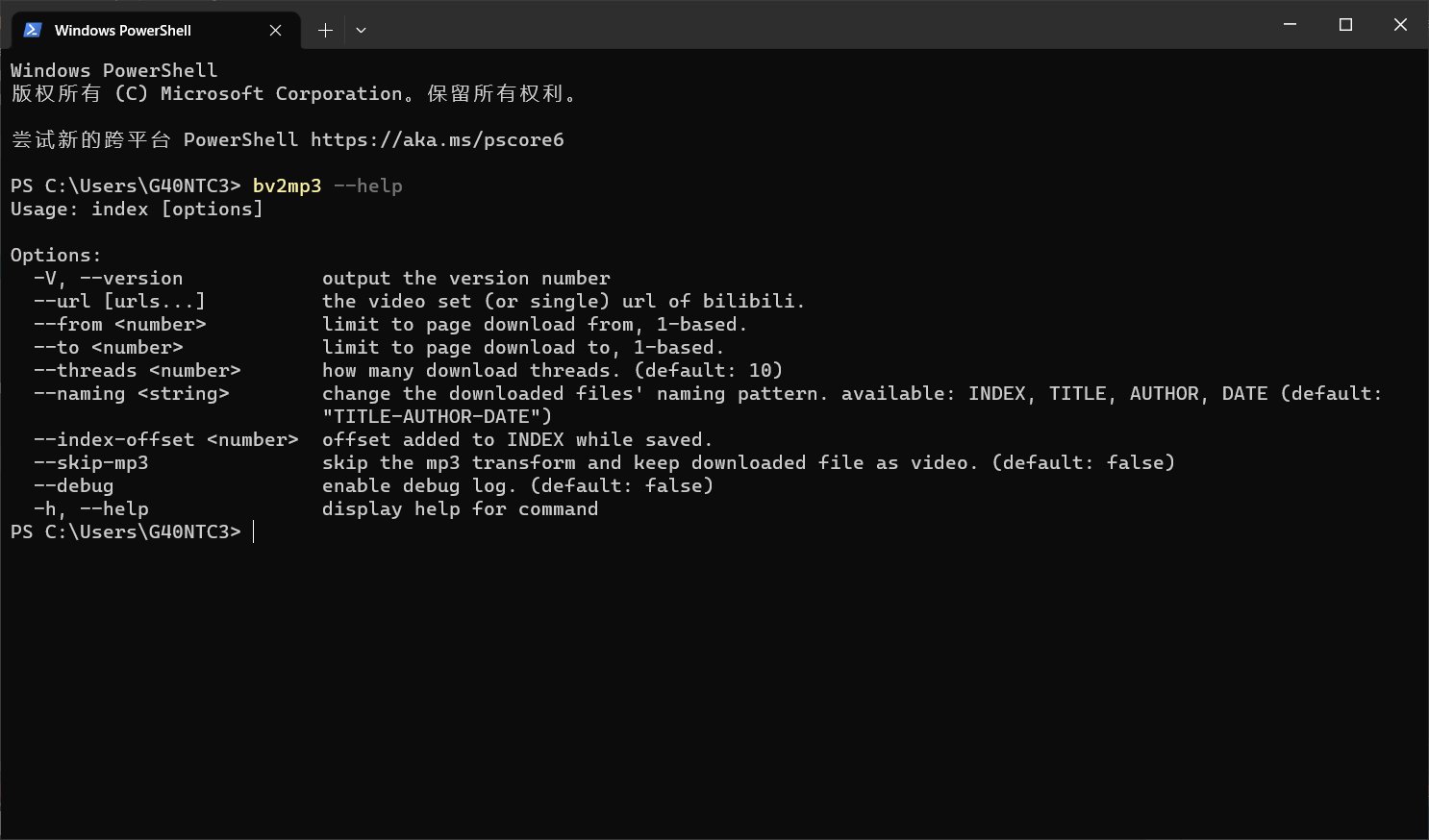
<p>我习惯用网易云听歌。网易云虽然版权方面很惨，但有它一个很好用的功能：云盘。每个用户有 60G 的云盘容量，基本用不完，不管是什么歌，有没有版权，只要上传上去了就能随时随地听。因此，我的目标是，希望可以有一个自动化的工具，帮我把 b 站上的歌以 mp3 的格式下载下来，让我可以上传到云盘，这样我就可以用网易云听歌了。</p>
<p>综上所述，我就做了这么一个小工具：<a href="https://github.com/wxsms/bilibili-video2mp3">bv2mp3</a> ，这是一个开源工具，完整的代码可以在代码仓库中找到。下面，我主要讲一下这个工具的实现思路以及优化过程。</p>
<p><img src="/blog/2023/bv2mp3/bv2mp3.png" alt="126f0ee04db59831d6a9820ac89c471.jpg"></p>]]>
    </summary>
    <title>做了一个 b 站视频下载与 mp3 转换工具</title>
    <updated>2026-10-18T01:01:52.851Z</updated>
  </entry>
  <entry>
    <author>
      <name>wxsm</name>
    </author>
    <category term="javascript" scheme="https://wxsms.github.io/blog/tags/javascript/"/>
    <category term="docker" scheme="https://wxsms.github.io/blog/tags/docker/"/>
    <id>https://wxsms.github.io/blog/2023/a-static-file-docker-image-issue/</id>
    <link href="https://wxsms.github.io/blog/2023/a-static-file-docker-image-issue/"/>
    <published>2023-03-23T09:41:39.000Z</published>
    <summary>
      <![CDATA[<p>今天想要打包一个 Docker 镜像，里面只包含一些静态的前端文件。为了使体积足够小，想到的方案是把命令全部集中在一个 RUN 上，类似这样：</p>
<figure class="highlight dockerfile"><table><tr><td]]>
    </summary>
    <title>静态文件 Docker 镜像问题一则</title>
    <updated>2026-10-18T01:01:52.850Z</updated>
  </entry>
  <entry>
    <author>
      <name>wxsm</name>
    </author>
    <category term="javascript" scheme="https://wxsms.github.io/blog/tags/javascript/"/>
    <category term="vue" scheme="https://wxsms.github.io/blog/tags/vue/"/>
    <id>https://wxsms.github.io/blog/2023/vue3-reactive/</id>
    <link href="https://wxsms.github.io/blog/2023/vue3-reactive/"/>
    <published>2023-03-17T08:09:48.000Z</published>
    <summary>
      <![CDATA[<p>Vue3 与 Vue2 的最大不同点之一是响应式的实现方式。众所周知，Vue2 使用的是 <code>Object.defineProperty</code>，为每个对象设置 getter 与 setter，从而达到监听数据变化的目的。然而这种方式存在诸多限制，如对数组的支持不完善，无法监听到对象上的新增属性等。因此 Vue3 通过 Proxy API 对响应式系统进行了重写，并将这部分代码封装在了 <code>@vue/reactivity</code> 包中。</p>
<p>本文将参照 Vue3 的设计，从零开始实现一套响应式系统。注意本文引用的代码与实际的 Vue3 实现方式有所出入，Vue3 需要更多地考虑高效与兼容各种边界情况，但此处以易懂为主。 文中提到的大部分代码可以在 <a href="https://github.com/wxsms/learning-vue">https://github.com/wxsms/learning-vue</a> 找到。</p>]]>
    </summary>
    <title>从零开始实现 Vue3 响应式</title>
    <updated>2026-10-18T01:01:52.873Z</updated>
  </entry>
  <entry>
    <author>
      <name>wxsm</name>
    </author>
    <category term="personal" scheme="https://wxsms.github.io/blog/tags/personal/"/>
    <id>https://wxsms.github.io/blog/2022/2022-05-20/</id>
    <link href="https://wxsms.github.io/blog/2022/2022-05-20/"/>
    <published>2022-05-20T03:08:57.000Z</published>
    <summary>
      <![CDATA[<p>很久没更新了，最近有点懒。也没什么想写的。</p>
<p>在新公司（金山办公）上班一年了，工作量并不大，但是干得感觉比之前更累了。主要可能有两个原因：一是之前的负责人在我入职不久后就走了，结果我又变成了负责人（离开西山居的原因之一就是不想做不责人）。二是，做的项目比较偏探索]]>
    </summary>
    <title>2022/05/20</title>
    <updated>2026-10-18T01:01:52.850Z</updated>
  </entry>
  <entry>
    <author>
      <name>wxsm</name>
    </author>
    <category term="personal" scheme="https://wxsms.github.io/blog/tags/personal/"/>
    <id>https://wxsms.github.io/blog/2021/a-memorable-moment/</id>
    <link href="https://wxsms.github.io/blog/2021/a-memorable-moment/"/>
    <published>2021-11-12T03:26:58.000Z</published>
    <summary>
      <![CDATA[<p>昨天正式受邀（实际上是我申请的）进入了 <a href="https://github.com/vuejs">vuejs</a> 组织。虽然目前只是 doc team，但是我相信以后可以做更多的事情。</p>
<p><img]]>
    </summary>
    <title>值得纪念的时刻</title>
    <updated>2026-10-18T01:01:52.850Z</updated>
  </entry>
  <entry>
    <author>
      <name>wxsm</name>
    </author>
    <category term="nodejs" scheme="https://wxsms.github.io/blog/tags/nodejs/"/>
    <category term="npm" scheme="https://wxsms.github.io/blog/tags/npm/"/>
    <id>https://wxsms.github.io/blog/2021/npm-history/</id>
    <link href="https://wxsms.github.io/blog/2021/npm-history/"/>
    <published>2021-11-08T04:56:13.000Z</published>
    <summary>
      <![CDATA[<h2 id="在没有包管理器之前"><a href="#在没有包管理器之前" class="headerlink" title="在没有包管理器之前"></a>在没有包管理器之前</h2><p>正确来说 Node.js 是不存在没有包管理器的时期的。从 <a href="https://nodejs.dev/learn/a-brief-history-of-nodejs">A brief history of Node.js</a> 里面可以看到，当 2009 年 Node.js 问世的时候 NPM 的雏形也发布了。当然因为 Node.js 跟前端绑得很死，这里主要谈一谈前端在没有包管理器的时期是怎样的。</p>
<p>那时候做得最多的事情就是：</p>
<ol>
<li>网上寻找各软件的官网，比如 jQuery；</li>
<li>找到下载地址，下载 zip 包；</li>
<li>解压，放到项目中一个叫 libs 的目录中；</li>
<li>想更方便的话，直接将 CDN 链接粘贴到 HTML 中。</li>
</ol>
<p>四个字总结：刀耕火种。 模块化管理？版本号管理？依赖升级？不存在的。当然，那时候前端也没有那么复杂，这种模式勉强来说也不是不能用。</p>]]>
    </summary>
    <title>Node.js 包管理器发展史</title>
    <updated>2026-10-18T01:01:52.866Z</updated>
  </entry>
  <entry>
    <author>
      <name>wxsm</name>
    </author>
    <category term="shell" scheme="https://wxsms.github.io/blog/tags/shell/"/>
    <category term="windows" scheme="https://wxsms.github.io/blog/tags/windows/"/>
    <id>https://wxsms.github.io/blog/2021/windows-idea-cygwin/</id>
    <link href="https://wxsms.github.io/blog/2021/windows-idea-cygwin/"/>
    <published>2021-10-25T02:23:24.000Z</published>
    <summary>
      <![CDATA[<p>之前在 <a href="/2020/wsl-on-windows-10-and-node-js/">WSL on Windows 10</a> 中尝试了 WSL，但是几经周折最后发现问题比较多，用得有点难受。最后还是换回了 windows。</p>]]>
    </summary>
    <title>在 Windows 中使用 Cygwin</title>
    <updated>2026-10-18T01:01:52.873Z</updated>
  </entry>
  <entry>
    <author>
      <name>wxsm</name>
    </author>
    <category term="php" scheme="https://wxsms.github.io/blog/tags/php/"/>
    <category term="mysql" scheme="https://wxsms.github.io/blog/tags/mysql/"/>
    <id>https://wxsms.github.io/blog/2021/php-note/</id>
    <link href="https://wxsms.github.io/blog/2021/php-note/"/>
    <published>2021-10-13T14:05:10.000Z</published>
    <summary>
      <![CDATA[<p>Php 个人速查笔记。</p>]]>
    </summary>
    <title>Php Note</title>
    <updated>2026-10-18T01:01:52.869Z</updated>
  </entry>
  <entry>
    <author>
      <name>wxsm</name>
    </author>
    <category term="personal" scheme="https://wxsms.github.io/blog/tags/personal/"/>
    <id>https://wxsms.github.io/blog/2021/blog-migrate-to-hexo/</id>
    <link href="https://wxsms.github.io/blog/2021/blog-migrate-to-hexo/"/>
    <published>2021-10-13T09:23:16.000Z</published>
    <summary>
      <![CDATA[<p>博客迁移至 Hexo。主要原因是：</p>
<ol>
<li>Vuepress 有部分 bug 难以忍受，而且 v1 仓库已经停止维护了；</li>
<li>Vuepress 的功能对于 blog 来说还是有些弱；</li>
<li>Vuepress v1]]>
    </summary>
    <title>博客迁移至 Hexo</title>
    <updated>2026-10-18T01:01:52.851Z</updated>
  </entry>
  <entry>
    <author>
      <name>wxsm</name>
    </author>
    <category term="css" scheme="https://wxsms.github.io/blog/tags/css/"/>
    <id>https://wxsms.github.io/blog/2021/simple-css-dark-mode/</id>
    <link href="https://wxsms.github.io/blog/2021/simple-css-dark-mode/"/>
    <published>2021-10-07T19:38:08.745Z</published>
    <summary>
      <![CDATA[<!-- 「」 -->

<figure class="highlight css"><table><tr><td class="code"><pre><span class="line"><span class="keyword">@media</span> (<span]]>
    </summary>
    <title>简单 CSS 实现暗黑模式</title>
    <updated>2026-10-18T01:01:52.872Z</updated>
  </entry>
  <entry>
    <author>
      <name>wxsm</name>
    </author>
    <category term="go" scheme="https://wxsms.github.io/blog/tags/go/"/>
    <id>https://wxsms.github.io/blog/2021/learn-golang/</id>
    <link href="https://wxsms.github.io/blog/2021/learn-golang/"/>
    <published>2021-09-30T01:49:29.406Z</published>
    <summary>
      <![CDATA[<p>我的 golang 学习笔记。好几年前就说要学了，现在终于兑现。</p>]]>
    </summary>
    <title>golang 学习笔记</title>
    <updated>2026-10-18T01:01:52.860Z</updated>
  </entry>
  <entry>
    <author>
      <name>wxsm</name>
    </author>
    <category term="markdown" scheme="https://wxsms.github.io/blog/tags/markdown/"/>
    <category term="idea" scheme="https://wxsms.github.io/blog/tags/idea/"/>
    <id>https://wxsms.github.io/blog/2021/paste-image-into-markdown-in-jetbrains-ide/</id>
    <link href="https://wxsms.github.io/blog/2021/paste-image-into-markdown-in-jetbrains-ide/"/>
    <published>2021-09-30T01:14:26.910Z</published>
    <summary>
      <![CDATA[<p>其实不需要装任何插件，IDE 自带的 Markdown 插件即可支持该操作：</p>
<ol>
<li>使用任意截图软件截图到剪贴板；</li>
<li>Ctrl + V 复制到编辑器中；</li>
<li>IDE 会自动生成图片文件 <code>img.png</code>（如果已存在，则会加自增后缀），以及相应的 Markdown 标签 <code>![img.png](img.png)</code>。</li>
</ol>
<p>但是，默认的插件不能配置保存路径（只能是 markdown 文件所在的路径），也不能配置命名规则，因此找了一个插件来增强这个功能。</p>]]>
    </summary>
    <title>在 JetBrains IDE 中向 Markdown 粘贴图片</title>
    <updated>2026-10-18T01:01:52.868Z</updated>
  </entry>
  <entry>
    <author>
      <name>wxsm</name>
    </author>
    <category term="javascript" scheme="https://wxsms.github.io/blog/tags/javascript/"/>
    <category term="vue" scheme="https://wxsms.github.io/blog/tags/vue/"/>
    <category term="react" scheme="https://wxsms.github.io/blog/tags/react/"/>
    <id>https://wxsms.github.io/blog/2021/react-hooks-vs-vca/</id>
    <link href="https://wxsms.github.io/blog/2021/react-hooks-vs-vca/"/>
    <published>2021-07-28T01:18:04.925Z</published>
    <summary>
      <![CDATA[<p>关于 React Hooks 与 Vue Composite API：</p>
<ul>
<li>React 16.8 新增了 <a href="https://reactjs.org/docs/hooks-intro.html">Hooks API</a> （简称 hooks)</li>
<li>Vue 3.0 新增了 <a href="https://v3.cn.vuejs.org/guide/composition-api-introduction.html">Composite API</a> （简称 VCA）</li>
</ul>
<p>二者为了共同的目的，在接近的时间点，以非常相似但是又带有本质区别的方式，推出了各自对于未来前端代码结构发展的新思路。本文在对二者做一些简单介绍的同时，也会重点关注二者之间的统一与区别。</p>]]>
    </summary>
    <title>前端 MVC 的未来：浅谈 Hooks 与 VCA 在设计思路上的异同</title>
    <updated>2026-10-18T01:01:52.869Z</updated>
  </entry>
  <entry>
    <author>
      <name>wxsm</name>
    </author>
    <category term="github" scheme="https://wxsms.github.io/blog/tags/github/"/>
    <category term="gfw" scheme="https://wxsms.github.io/blog/tags/gfw/"/>
    <id>https://wxsms.github.io/blog/2021/a-simple-way-to-speed-up-github-connection/</id>
    <link href="https://wxsms.github.io/blog/2021/a-simple-way-to-speed-up-github-connection/"/>
    <published>2021-07-25T19:39:37.923Z</published>
    <summary>
      <![CDATA[<p>在不想全局 vpn 的情况下，可以用 host 加速。</p>
<p>该方法主要利用 <a href="https://github.com/ineo6/hosts">github.com&#x2F;ineo6&#x2F;hosts</a> 的 hosts 文件，国内镜像]]>
    </summary>
    <title>比较简单的 GitHub 加速方式</title>
    <updated>2026-10-18T01:01:52.850Z</updated>
  </entry>
  <entry>
    <author>
      <name>wxsm</name>
    </author>
    <category term="javascript" scheme="https://wxsms.github.io/blog/tags/javascript/"/>
    <category term="regex" scheme="https://wxsms.github.io/blog/tags/regex/"/>
    <id>https://wxsms.github.io/blog/2021/regex-assertions/</id>
    <link href="https://wxsms.github.io/blog/2021/regex-assertions/"/>
    <published>2021-04-03T03:59:18.278Z</published>
    <summary>
      <![CDATA[<blockquote>
<p>Assertions include boundaries, which indicate the beginnings and endings of lines and words, and other patterns indicating in some way that a match is possible (including look-ahead, look-behind, and conditional expressions).</p>
</blockquote>
<p>断言是正则表达式组成的一部分，包含两种断言。本文记录了一些常用断言。</p>]]>
    </summary>
    <title>正则断言</title>
    <updated>2026-10-18T01:01:52.871Z</updated>
  </entry>
  <entry>
    <author>
      <name>wxsm</name>
    </author>
    <category term="javascript" scheme="https://wxsms.github.io/blog/tags/javascript/"/>
    <category term="miniprogram" scheme="https://wxsms.github.io/blog/tags/miniprogram/"/>
    <category term="test" scheme="https://wxsms.github.io/blog/tags/test/"/>
    <id>https://wxsms.github.io/blog/2021/unit-test-best-practice-of-mini-program/</id>
    <link href="https://wxsms.github.io/blog/2021/unit-test-best-practice-of-mini-program/"/>
    <published>2021-03-14T20:26:49.652Z</published>
    <summary>
      <![CDATA[<p>微信小程序单元测试的可查资料少得可怜，由于微信官方开发的自动化测试驱动器 <a href="https://www.npmjs.com/package/miniprogram-automator">miniprogram-automator</a> 不开源，唯一靠谱的地方只有这 <a href="https://developers.weixin.qq.com/miniprogram/dev/devtools/auto/">一份简单的文档</a>。然而实际使用下来发现文档介绍的方式有不少问题。</p>]]>
    </summary>
    <title>小程序单元测试最佳实践</title>
    <updated>2026-10-18T01:01:52.872Z</updated>
  </entry>
</feed>